n8n template · Clinics and appointments
AI receptionist for clinic appointments
A phone receptionist on your own line that answers questions, takes new appointment requests and, before sharing any appointment detail, verifies the caller with their appointment number and a 4-digit PIN.
Free n8n template
Try the live phone demo
Call an AI agent on a real phone number. No Voicely signup is needed to try these public demonstrations.
DemoCare clinic receptionist
Try a fictional clinic receptionist with caller verification and appointment lookup.
Call +1 406 375 3307Try this call
- Ask the receptionist about checking an appointment.
- You can also request an appointment and look for the saved request after the call. Reception confirms requests separately. This demo does not provide medical advice.
Try one of these
- APT-2101 · General physician visit: ask the time · Demo PIN 4821
- APT-2102 · Dentist visit: ask to reschedule · Demo PIN 7350
- APT-2103 · Dermatology visit: ask to confirm · Demo PIN 2694
- APT-2104 · Confirmed check-up: ask to cancel · Demo PIN 7350
Recent public calls
Live workflow results
One workflow, one webhook
How the clinic appointment receptionist works
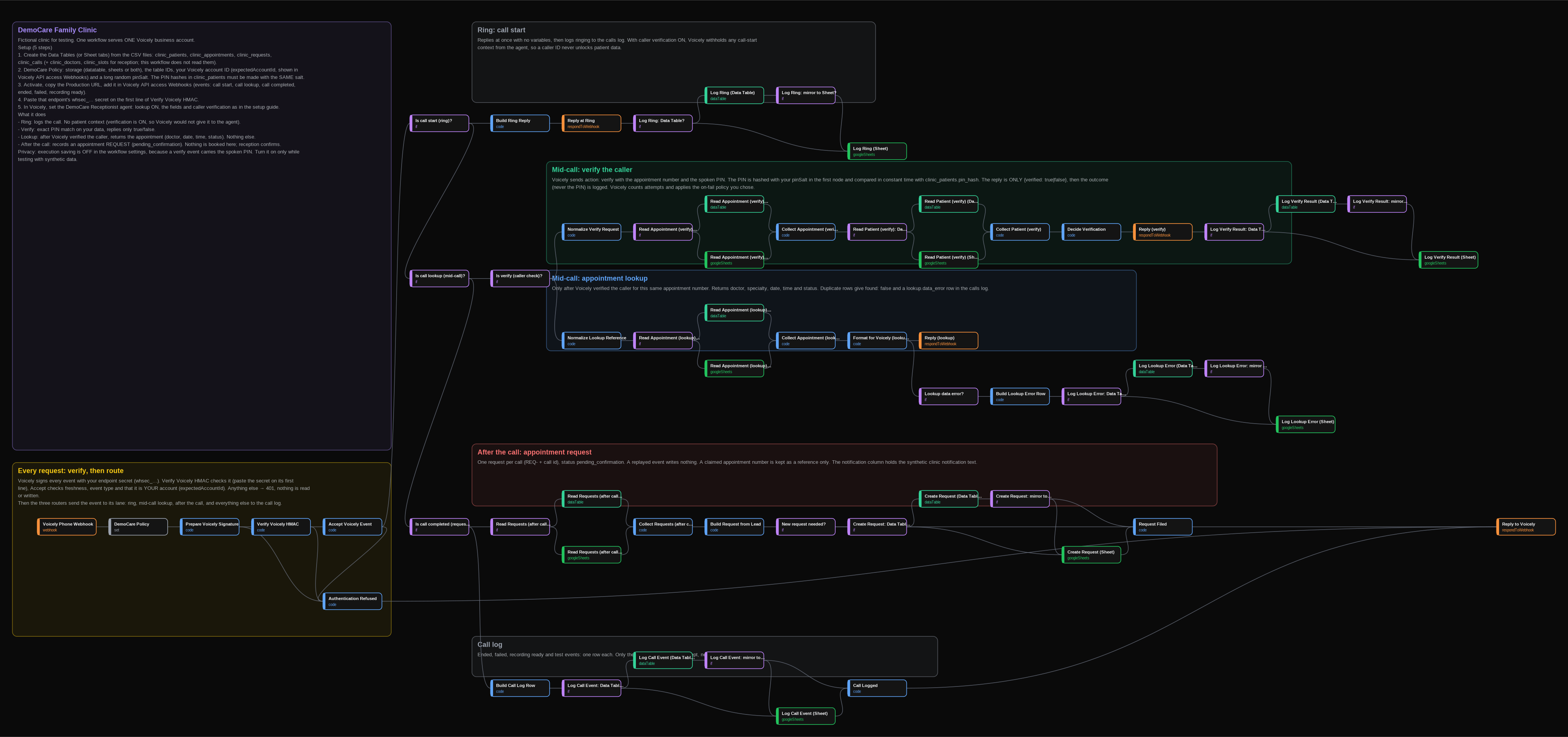
Voicely sends every call event to one signed n8n webhook. The workflow checks the signature first, then routes the event to its lane.
Lane 1
Security
Checks the Voicely signature, refuses requests outside a short time window, and accepts only events from your own Voicely account.
Lane 2
Ring
Answers at once and only logs the call. A caller ID is never treated as identity, so no patient data is sent at ring time.
Lane 3
Verify the caller
Hashes the spoken PIN with your salt and compares it in constant time with the stored hash. An unknown appointment and a wrong PIN give the same answer.
Lane 4
Appointment lookup
Only after the caller was verified for that same appointment number. Returns doctor, specialty, date, time and status.
Lane 5
After the call
Writes one appointment request per call with status pending_confirmation. A reschedule or cancellation never changes the existing appointment.
Lane 6
Call log
One row per ended or failed call and per ready recording. Only the signed recording link is kept, never transcript text.
Built so the PIN stays private
- Patients are stored with a salted PIN hash, never the PIN itself.
- Execution saving is off in the workflow settings, so n8n does not keep the request that carried the PIN.
- Voicely masks verification values in the extracted lead, in its webhook transcript and in the transcript download.
- After the set number of wrong attempts, the agent continues without appointment details.
- The caller never learns whether an appointment number exists.
What the caller hears
Agent: Thank you for calling DemoCare Family Clinic. I'm your AI receptionist, and this call is recorded. Are you calling about an existing appointment, or would you like to request a new one?
Caller: An existing one. My appointment number is 2101.
Agent: To access your appointment details, please provide your 4-digit PIN.
Caller: (says the PIN)
Agent: One moment while I check that and pull up your details.
Agent: Your appointment is with Dr. Amelia Noor, General Physician, on Tuesday 24 November at 12:00 PM, and it is confirmed. Is there anything else I can help you with?
Inside the template
- 69 nodes in 6 lanes, each with its own note
- Webhook, Code, If, Data Table and Google Sheets nodes only
- Stores: patients, doctors, slots, appointments, requests and calls
- Synthetic sample data: 3 patients, 3 doctors, 9 slots, 4 appointments
What you need
- A Voicely account with SIP & Phone, connected to your own SIP trunk or PBX
- n8n (cloud or self-hosted) with a public HTTPS webhook URL
- n8n Data Tables or a Google Sheet (with the Google Sheets credential in n8n)
From import to first call
Set it up in 5 steps
Step 1
Create the stores
Create six Data Tables from the sample CSV files: clinic_patients, clinic_doctors, clinic_slots, clinic_appointments, clinic_requests and clinic_calls. All columns are text.
Step 2
Import and fill in DemoCare Policy
Import the workflow (it arrives inactive). In DemoCare Policy, set storage to datatable, add the four table IDs (appointments, patients, requests, calls), set expectedAccountId to your Voicely account ID and set pinSalt. To use Google Sheets instead, set storage to sheets or both, add the spreadsheet ID and select your Google Sheets credential on the Sheet nodes. The sample PIN hashes use the salt democare-uat-2026-11-20-synthetic-salt; use your own salt for real patients. Data Tables only? Disable the (Sheet) nodes before Publish; n8n cannot publish them without a Google Sheets credential.
Step 3
Connect the Voicely webhook
In Voicely Webhooks, add the workflow's production URL and choose the events call completed, call ended, call failed and recording ready. Turn on Include phone numbers and paste the signing secret into the first line of the Verify Voicely HMAC node. The ring, verification and lookup requests are not events to tick: they reach the same endpoint once you choose it as the agent's call-start webhook and turn lookups on.
Step 4
Set up the receptionist
In your SIP workspace, give the agent the greeting, the business prompt and the lead fields below, and choose this endpoint as its call-start webhook. In Lookups, turn lookups On with the record name appointment and the reference appointment number, add the fields below, and turn on caller verification: always ask for pin, 3 attempts, then continue without record details.
Lead fields: request_type, caller_name, contact_number, email, doctor, requested_date, requested_time, appointment_reference, notes
Lookup fields (shared with the agent): doctor, specialty, appointment_date, appointment_time, status
Lookup field used to verify the caller: pin
Step 5
Test and call
Link a called number to the agent, activate the workflow and press Send test in Voicely Webhooks. Then call and ask about appointment 2101 with the sample PIN 4821.
Business prompt for the agent
You are the AI receptionist of DemoCare Family Clinic, a fictional family clinic (Monday to Saturday, 9 AM to 6 PM). Keep answers short, warm and professional.

Doctors and their PUBLISHED appointment windows:
- Dr. Amelia Noor, General Physician: Tuesday 12:00 PM to 1:00 PM; Thursday 10:00 AM to 11:00 AM.
- Dr. Ayaan Malik, Dentist: Wednesday 3:00 PM to 4:00 PM; Saturday 10:00 AM to 11:00 AM.
- Dr. Mira Shah, Dermatologist: Friday 11:00 AM to 12:00 PM.
These are published windows, not live availability. Never offer a time outside them; offer the next listed window instead.

New patients: no verification is needed to REQUEST an appointment. Ask for the doctor or specialty, the preferred day and time, their name and a contact number. Then say you will pass the request to reception, who will confirm.

Existing patients asking about an appointment: ask for the appointment number and their 4-digit PIN, then verify before sharing anything. Share only what the lookup returns. For a reschedule or cancellation, take the request; reception confirms and the existing appointment stays as it is until then.

Never diagnose or give medical advice. For chest pain, breathing trouble, heavy bleeding or other emergencies, tell the caller to call the local emergency number or go to the nearest emergency department now. Never repeat a PIN.
Honest limits
- The schedule in the prompt is published windows, not live availability. A full window is only known when you edit the prompt.
- Requests are not bookings: reception confirms every new, rescheduled or cancelled appointment.
- The call recording keeps what the caller said, including a spoken PIN, under your recording retention.
- The agent gives no medical advice and sends emergencies to emergency services.
Download the template
AI receptionist and appointment request questions
Where do I set up the receptionist’s language and webhook?
In the SIP workspace, choose the starting language, write the greeting and select the n8n endpoint as the call-start webhook. Configure caller verification and appointment fields in Lookups.
How does the AI receptionist verify a caller?
It asks for the appointment number and a 4-digit PIN. Voicely sends both to your workflow, which hashes the PIN with your salt and compares it with the stored hash. Details are shared only after a match.
Does n8n store the PIN?
No. The patient table holds only a salted hash, and the workflow turns off execution saving so the request that carried the PIN is not kept.
Can the receptionist book or cancel appointments?
It takes the request and writes it for reception with status pending_confirmation. Reception confirms, and the existing appointment does not change until then.
Can new patients call without a PIN?
Yes. Asking for a new appointment needs no verification. The agent takes the doctor or specialty, the preferred time, a name and a contact number.
What happens after too many wrong PINs?
After the number of attempts you set, the agent apologises and continues without appointment details. You can also choose to end the call politely instead.
Another template
AI phone agent for order status calls
For stores and delivery teams. Greets the caller by name, answers order status, looks up other orders mid-call and files a ticket after the call.