AI Text-to-Speech App for Android
Write a script on your phone and hear it in a natural AI voice. Voicely for Android is the same studio as the website, built for Urdu, Hindi and English and many more languages, with the same account and the same credits.
Voicely for Android is in closed, pre-launch testing on Google Play. Access is by request and reviewed by hand, and we do not promise a public launch date.
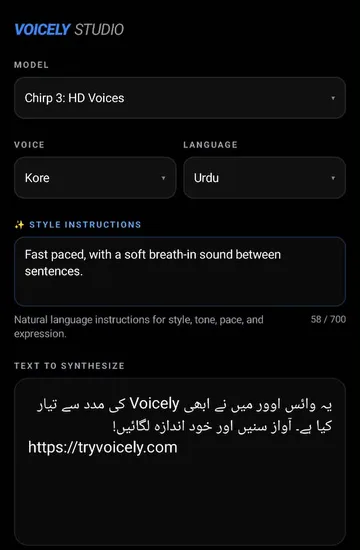
What the Voicely app for Android does
Type or paste your text
Write a caption, a lesson or a script directly in the app, in Urdu or Hindi script, English or another supported language.
Pick a voice, language and model
Choose a Voicely AI voice and model, and set the language your text is written in.
Direct the delivery
Style instructions in plain English tell the voice how to read: slower, warmer, calmer, or like a documentary narrator.
Generate and play
Generate, then listen in the app. Repeating an identical generation (same text and settings) does not use another credit.
Save the audio file
Save the audio to your phone through Android's file picker, as the WAV or MP3 file your generation produced.
Share to any app
Send your voiceover to WhatsApp, YouTube, Instagram or anywhere else through Android's share sheet.
How it works on your phone
- Step 1
Sign in with Google
Use the Google account you use for Voicely. Your history and credits come with you.
- Step 2
Write and choose
Enter your text, pick a voice, a language and a model, and add a style instruction if you like.
- Step 3
Generate and listen
Tap Play to generate and hear the result in the app.
- Step 4
Save or share
Keep the audio file on your phone or send it straight to another app.
Urdu, Hindi and English text to speech on Android
Urdu
Urdu script is typed and shown right to left, and read aloud by the same voices as on the web. Urdu text to speech on the web.
Hindi
Hindi in Devanagari script, for reels, lessons and explainers. Hindi text to speech on the web.
English
Narration, product videos, study notes and anything you would rather hear than read. English text to speech on the web.
- The app also includes many other languages from the Voicely studio, such as Bengali, Punjabi, Tamil, Telugu and Arabic.
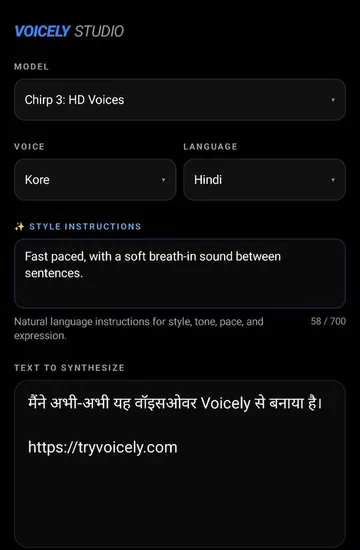
Made for voiceovers on the go
YouTube, Shorts and Reels
Record a voiceover for a video you are editing on your phone, in the language your audience speaks.
Study and revision
Turn notes into audio you can listen to on the way to class.
Small business messages
Make a short spoken announcement or product explainer for WhatsApp and social posts.
Listening instead of reading
Hear a letter, an article or a long message read to you in a natural voice.
Same account and credits as the website
One account, web and Android
Sign in with the same Voicely account on the website and in the app. Your generation history is synced with your Voicely account, not locked to one phone.
One credit balance
Credits are shared between the website and the app, so a balance never gets stranded on a device. They are website/app credits, not API wallet characters.
Google Play billing
Buying credits in the app is a real, paid Google Play purchase, not a free or test transaction. The credits go to the Voicely account signed in inside the app, and you can use them on the web too. Google decides which payment methods you see.
Prefer the browser? Voicely Studio works on the web, and credit packs are on the website as well.
Privacy and account safety
- Purchases are checked on our server with Google before any credits are added, and each purchase is tied to the Voicely account signed in inside the app.
- We never see your card or bank details: Google Play handles the payment.
- The app uses the same Voicely account, privacy policy and content rules as the website.
Requirements
- Android 8.0 or newer.
- An internet connection: voices are generated on Voicely's servers, not on the phone.
- A Google account, to sign in and to buy through Google Play.
Voicely app for Android FAQ
Is there a Voicely app for Android?
Yes. Voicely for Android is in closed, pre-launch testing on Google Play. You can request access from your Voicely account; requests are reviewed by hand.
Can the app read Urdu text aloud?
Yes. You can type or paste Urdu script, choose Urdu as the language and a voice, and play, save or share the result.
Which languages does the Android app support?
Urdu, Hindi and English, plus the other languages in the Voicely studio such as Bengali, Punjabi, Tamil, Telugu and Arabic.
Can I save the audio or share it as a file?
Yes. Save the audio to your phone through Android's file picker, as the WAV or MP3 file your generation produced, or share it to another app through Android's share sheet.
Is my history saved on my phone?
Your generation history is synced with your Voicely account, so you see it in the app wherever you sign in, rather than only on one phone.
Are app credits the same as website credits?
Yes. Credits are shared between the app and the website on the same Voicely account. Credits bought through Google Play are real paid credits, and they are not API wallet characters.
Does it work offline or as a screen reader voice?
No. The app needs an internet connection because voices are generated on Voicely's servers, and it is not a system text-to-speech engine for TalkBack or other apps.
Which Android version do I need?
Android 8.0 or newer, with an internet connection and a Google account.
Get Voicely on your Android phone
Voicely for Android is in closed, pre-launch testing on Google Play. Access is by request and reviewed by hand, and we do not promise a public launch date.
Android is a trademark of Google LLC. Google Play and the Google Play logo are trademarks of Google LLC.