n8n template · Stores and delivery
AI phone agent for order status calls
Answer "where is my order?" on your own phone line. The agent greets a known caller by name, reads their order status from your n8n data, looks up any other order during the call and files a support ticket with a reference after the call.
Free n8n template
Try the live phone demo
Call an AI agent on a real phone number. No Voicely signup is needed to try these public demonstrations.
DemoMart order status agent
Call a fictional shop, look up an order and ask for a support request.
Call +1 650 402 3307Try this call
- Ask for an order status.
- Ask to pass a delivery issue to support. Use the ticket reference to find the saved result. No PIN is needed.
Try one of these
- DM-1042 · Out for delivery: ask when it arrives
- DM-2088 · Delivered: report a problem with the order
- DM-3093 · Pending verification: ask what is needed
- DM-4107 · Delayed: ask why it is late
- DM-6011 · Pending verification: ask for a status update
Recent public calls
Live workflow results
One workflow, one webhook
How the order status phone agent works
Voicely sends every call event to one signed n8n webhook. The workflow checks the signature first, then routes the event to its lane.
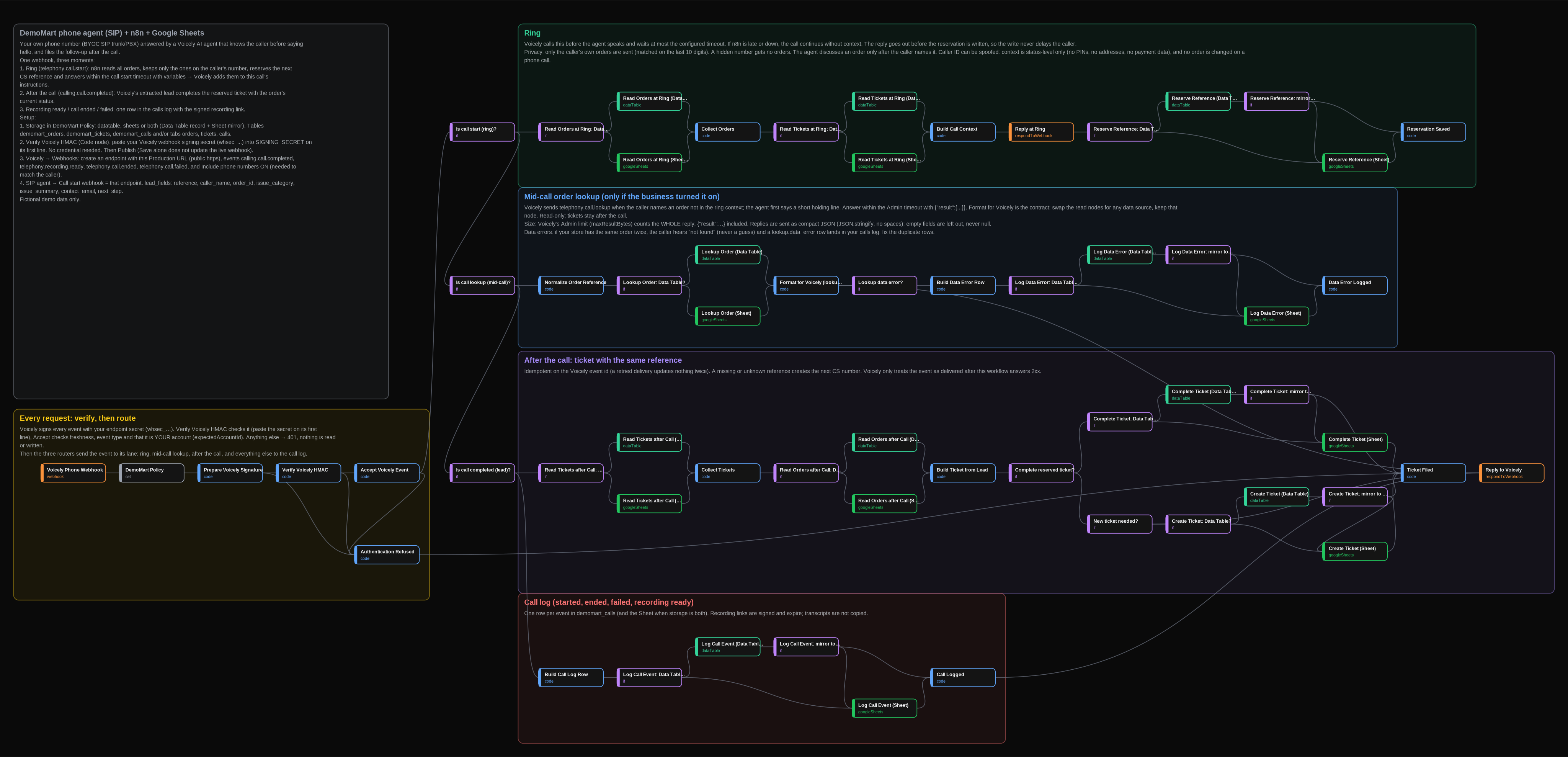
Lane 1
Security
Checks the Voicely signature, refuses requests outside a short time window, and accepts only events from your own Voicely account.
Lane 2
Ring
Before the agent speaks, finds the orders on the caller's number and reserves the next ticket reference. Voicely waits only a short, fixed time; if the reply is late, the call continues without it.
Lane 3
Mid-call lookup
When the caller gives an order number that was not in the ring context, reads that one order and returns only caller-safe fields.
Lane 4
After the call
Completes the reserved ticket from the lead Voicely extracts after the call, with the order's current status. A retried event changes nothing twice.
Lane 5
Call log
One row per started, ended or failed call and per ready recording. Recording links are signed and expire; transcripts are not copied.
What the caller hears
Agent: Thank you for calling DemoMart. Hi Bilal, are you calling about order DM-1042?
Caller: Yes. When will it arrive?
Agent: DM-1042 is out for delivery and expected on 18 November.
Caller: There is also order DM-2088. It says delivered but we never got it.
Agent: Please give me a moment while I pull up that order.
Agent: DM-2088 shows as delivered on 17 November. I am noting that you did not receive it. Your reference is CS-5011, and the team will review it after this call.
Inside the template
- 67 nodes in 5 lanes, each with its own note
- Webhook, Code, If, Data Table and Google Sheets nodes only
- Storage switch: Data Tables, Google Sheets, or both (the Data Table is the record and the Sheet mirrors it)
- Sample orders with synthetic customers, plus ticket and call log headers
What you need
- A Voicely account with SIP & Phone, connected to your own SIP trunk or PBX
- n8n (cloud or self-hosted) with a public HTTPS webhook URL
- n8n Data Tables or a Google Sheet (with the Google Sheets credential in n8n)
From import to first call
Set it up in 5 steps
Step 1
Create the stores
Create three Data Tables (orders, tickets, calls) or a Google Sheet with the tabs orders, tickets and calls. Import the sample orders, and paste the ticket and call headers as row 1. Put your own phone number on one sample order to see the ring context on your first call.
Step 2
Import and fill in DemoMart Policy
Import the workflow (it arrives inactive). In the DemoMart Policy node, set storage to datatable, sheets or both, add the table IDs or the spreadsheet ID, and set expectedAccountId to your Voicely account ID. The workflow refuses to run while that value is empty. Data Tables only? Disable the (Sheet) nodes before Publish; n8n cannot publish them without a Google Sheets credential.
Step 3
Connect the Voicely webhook
In Voicely Webhooks, add the workflow's production URL. Choose the events call completed, recording ready, call ended and call failed, and turn on Include phone numbers so orders can match the caller. Copy the signing secret into the first line of the Verify Voicely HMAC node.
Step 4
Set up the phone agent
In your SIP workspace, choose this endpoint as the agent's call-start webhook (ring-time and lookup requests go to it automatically), add the lead fields below and append the business prompt. In Lookups, turn lookups On with the record name order and the reference order number, add the four fields below as Text, shared with the agent, and leave caller verification off. Save lookups.
Lead fields: reference, caller_name, order_id, issue_category, issue_summary, contact_email, next_step
Lookup fields (Text, shared with the agent): status, expected_delivery, revised_delivery, delivered_on
Step 5
Test and call
Activate the workflow and press Send test in Voicely Webhooks: a row appears in the call log. Then call your number and ask about a sample order.
Business prompt for the agent
CALL CONTEXT, when present, lists this caller's orders (matched by their phone number) and a reserved_reference.
- Ask for the order number first. If the order is listed in CALL CONTEXT, answer from it.
- If the order is NOT listed and lookups are on, look it up every time the caller gives a new or corrected number, and answer only from the result. Never say an order is unavailable without looking it up first.
  If lookups are off or unavailable, say you cannot see that order on this call and that you are noting the details for the team. Then take the order number, the problem and an email.
- If CALL CONTEXT shows more_orders_not_listed, ask which order the caller means.
- Before ending, tell the caller their reference (reserved_reference) and say the team will review it after the call. Never say a ticket was already saved, and never promise a callback time.
- issue_category must be one of: delivery_status_inquiry, delivered_not_received, verification_assistance, delivery_overdue, missing_order_payment, general_support.
- Never change an order on a phone call. Do not ask for or repeat PINs.
Honest limits
- The ring context is small (about 500 bytes). A long order list is trimmed and the agent asks which order the caller means.
- If n8n does not answer within the short call-start timeout, the call continues without context.
- Caller ID can be spoofed, so ring-time answers stay at order status level: no addresses, payment details or PINs.
- The agent never changes an order. It records the problem for your team as a ticket.
Download the template
Order status phone agent questions
Where do I set the language for the order status line?
Choose the starting language and write the greeting on your SIP agent. Set its call-start webhook and enable Lookups to let the agent request order fields from n8n.
How does the agent know who is calling?
When the phone rings, Voicely sends the caller's number to your workflow. The workflow returns that caller's orders, so the agent can greet them by name before the conversation starts.
Can callers ask about an order that is not on their number?
Yes, when you turn on Look up records during the call. The agent says a short holding line, your workflow reads that one order and returns only the fields you allow.
Will a caller hear "your ticket is saved" before it is?
No. The ticket is completed after the call from Voicely's extracted lead. During the call the agent gives the reference and says the team will review it.
Can I connect Shopify or my own order API instead?
Yes. Replace the Data Table or Google Sheets read nodes with your API call and keep the reply shape the template returns to Voicely.
What happens with duplicate order rows?
The caller hears that the order was not found instead of a guess, and a data error row lands in the call log so you can fix the store.
Another template
AI receptionist for clinic appointments
For clinics and practices. Verifies existing patients with a PIN before sharing appointment details and takes new appointment requests for reception.